Become an upEducators Digital Tools Trainer: My Roadmap
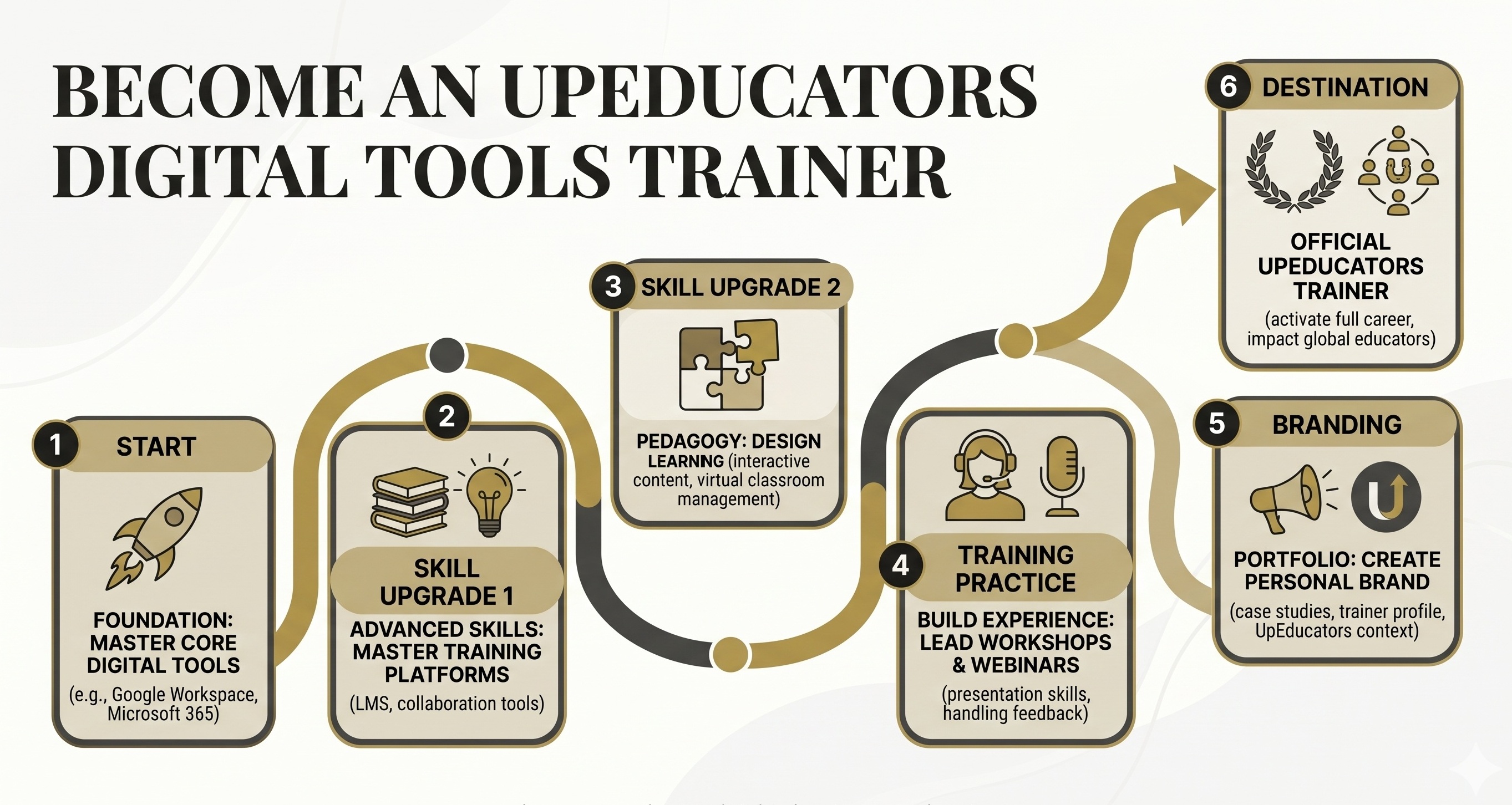
Every time I searched 'how to earn from home in India', I got recycled lists with zero real detail. I knew there had to be more than just surveys and data entry for someone with teaching experience. I found the upEducators Teacher Trainer role, registered for it while sitting in a train with bad internet, and within three weeks, I was earning more per hour than I ever did from offline tuitions.
How Much Can You Earn as an upEducators Digital Tools Trainer?
This is the first question I always ask myself when looking at a new earning opportunity. upEducators, a Google for Education Partner, hires Teacher Trainers for Digital Tools. Their compensation is listed as "As per Industry Standards," which often means it is negotiated based on your experience and the specific project.
From my experience with similar training roles and discussions with fellow educators, I can give you a realistic range. Remember, this is a remote, often freelance or part-time role, so your monthly income will depend on the number of projects and hours you commit.
- Entry Level (first 1-3 months): When you are just starting and building your reputation, you might expect to earn Rs. 600 – Rs. 900 per hour. If you dedicate 15-20 hours a week to training sessions and preparation, this could translate to Rs. 36,000 – Rs. 72,000 per month. It truly depends on project availability and your initial schedule.
- Intermediate (3-12 months): As you gain experience and positive feedback, your hourly rate can increase to Rs. 900 – Rs. 1,500. With a more consistent flow of projects, perhaps 20-30 hours a week, you could be looking at Rs. 72,000 – Rs. 1,80,000 per month. This stage is about proving your expertise and building a strong relationship with upEducators.
- Experienced (1+ year): For highly skilled trainers with a proven track record, rates can go upwards of Rs. 1,500 – Rs. 2,500+ per hour. If you take on more specialized or full-time projects, reaching Rs. 2,00,000+ per month is definitely achievable. This often involves leading more advanced workshops or becoming a lead trainer.
Factors like the complexity of the digital tools you teach, the level of teachers you are training (pre-primary vs. secondary), and your ability to create engaging content all play a role in your earning potential. Do not underestimate the power of positive feedback and repeat assignments.
How to Apply and Get Started with upEducators
The application process for a Teacher Trainer role with upEducators is straightforward, but it requires careful preparation. This is not like signing up for a regular tutoring platform; it is a professional training role.
Here are the exact steps I recommend based on my own application experiences for such roles:
- Step 1 — Find the job listing: upEducators frequently posts these roles on professional networking sites like LinkedIn. Search for "Teacher Trainer – Digital Tools" or similar titles by upEducators. Make sure it is the official listing.
- Step 2 — Review the requirements carefully: The job description specifies "3+ Years Experience" and a passion for teaching Digital Tools to Teachers. They look for dynamic and tech-savvy trainers. Before you even apply, make sure your experience aligns with what they are looking for.
- Step 3 — Tailor your resume: This is crucial. Do not send a generic resume. Highlight your experience in:
- Step 4 — Write a compelling cover letter: Explain why you are passionate about empowering educators with digital skills. Share a brief anecdote about a time you helped a teacher adopt a new tool successfully. Show them you understand their mission.
- Step 5 — Submit your application: Follow the instructions on the job portal. Double-check everything before hitting submit. I remember doing this multiple times, even from my tiny phone screen on that train.
- Step 6 — Prepare for the interview: If your application is shortlisted, you will likely have a screening call, followed by a more in-depth interview. Be ready to discuss your experience with various digital tools, your training methodology, and how you handle challenging participants.
- Step 7 — The Demo Session: This is often the most critical part. You will likely be asked to conduct a short demo training session on a specific digital tool. This is your chance to shine. Focus on clear explanations, engaging activities, and practical application. I have covered how to ace such demo sessions in detail on my YouTube channel — watch the full breakdown here.
- Step 8 — Onboarding and First Project: Once selected, you will go through onboarding. Pay close attention to their training guidelines and expectations. Your first project will be your opportunity to impress and secure more work.
The biggest mistake I made when I started was waiting for the 'perfect time.' There is no perfect time — just start with one student, one application, one step.
What You Need Before You Start as an upEducators Trainer
To succeed in this role, you need more than just a desire to teach. You need the right setup and the right mindset. Think of it as setting up your professional home office and sharpening your skills.
- Device Requirements: You will need a reliable laptop or desktop computer. A tablet might work for some tasks, but for conducting interactive training sessions, a proper computer is non-negotiable. Ensure it has a working webcam and microphone.
- Internet Connection: This is paramount for online training. You need a stable, high-speed internet connection. Nothing breaks the flow of a training session faster than a lagging video or dropped audio. I recommend having a backup plan, like a mobile hotspot, just in case.
- Quiet Workspace: Designate a quiet, professional space for your training sessions. Minimize background noise and distractions. A clean, uncluttered background (even a virtual one) helps maintain professionalism.
- Headset with Microphone: Invest in a good quality headset with a noise-cancelling microphone. Clear audio is essential for effective communication and ensuring all participants can hear you perfectly.
- Qualifications & Subject Expertise: As mentioned, 3+ years of experience in teaching or training is generally required. Beyond that, deep expertise in various digital tools for education is key. You must not only know how to use them but also how to teach others to integrate them effectively into their pedagogy. This includes tools for lesson planning, assessments, communication, and interactive learning.
- Strong Communication & Presentation Skills: You need to be an engaging speaker, able to simplify complex technical concepts for teachers with varying levels of digital literacy. Your ability to create clear, visually appealing presentations and facilitate interactive sessions will define your success.
- Time Commitment: upEducators offers remote, freelance, part-time, and full-time options. Be realistic about your availability. Even part-time roles require consistent time for preparation, conducting sessions, and follow-up. A minimum of 10-15 hours per week is a good starting point to build momentum.
Common Mistakes to Avoid as a Digital Tools Trainer
I have seen many talented educators struggle because they make some common, easily avoidable mistakes when transitioning to online training. Learning from these can save you a lot of frustration.
- Mistake 1 — Not Customizing Training Content: Many trainers deliver a generic presentation regardless of the audience. This is a huge miss. Teachers in a primary school will have different needs and skill levels than those in an IB school. Always ask about the participants' background and existing tech proficiency beforehand.
- Mistake 2 — Lack of Practical Application: It is easy to just talk about a tool. But teachers need to use it. Simply showing slides on how to use Google Forms is far less effective than having teachers create a sample quiz during the session.
- Mistake 3 — Poor Technical Setup & Session Management: An unstable internet connection, bad audio, or not knowing how to manage the virtual classroom (muting participants, sharing screens effectively) can ruin a session. It makes you look unprofessional.
- Mistake 4 — Overlooking Follow-up and Support: A one-time training session is rarely enough for lasting impact. Teachers will have questions and need support as they try to implement new tools in their classrooms.
- Mistake 5 — Being Too Rigid with the Agenda: Sometimes, during a session, teachers might express a pressing need for a specific tool or feature that was not on your agenda. Sticking rigidly to your plan can miss an opportunity to provide immediate value.
This role is a fantastic opportunity for experienced educators in India to leverage their skills and earn a significant income from home. It is about empowering other teachers, which is incredibly rewarding.
Have a question? Drop it in the comments on my YouTube channel @earnwithrupali — I personally reply to every one!
Your Ultimate Guide to Starting and Scaling Your Online Tutoring Career
Valued at Rs. 99 — FREE for you
Platform Comparison
UrbanPro
Rs. 20,000-45,000/month
Cuemath
Rs. 22,000-40,000/month
TeacherOn
Rs. 15,000-50,000/month
SuperProf
Rs. 20,000-60,000/month
Hover or click to see details
Related Articles
Never Miss a Free Guide
One free guide every week — straight to your inbox.